Whether you spend long hours crunching numbers in spreadsheets, attending back-to-back virtual meetings, writing long-form documents, or winding down with casual multimedia, your computer monitor is arguably the most important piece of hardware on your desk. Staring at a flat, washed-out, or flickering screen day after day leads to severe eye fatigue and neck strain.
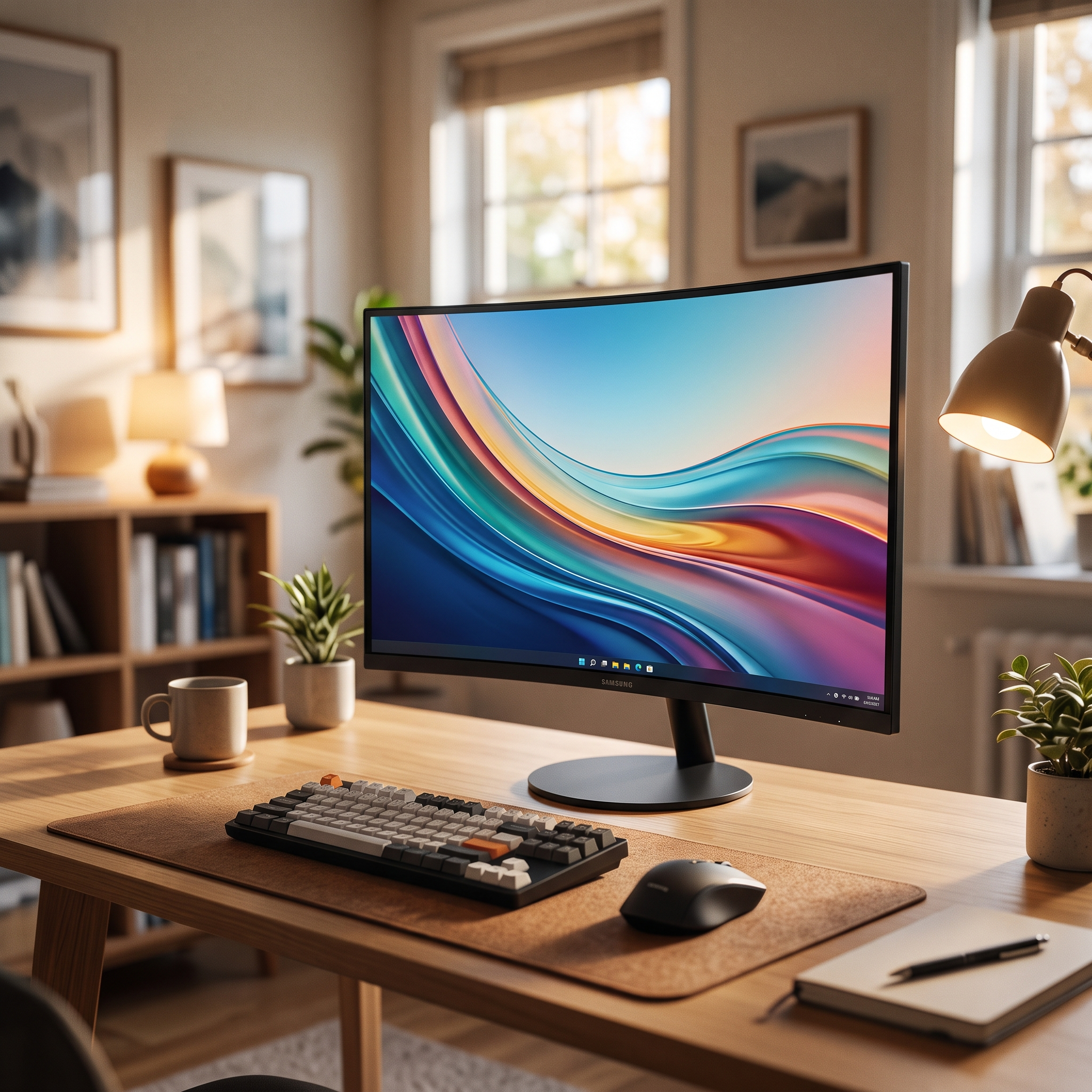
Enter the Samsung 27-Inch Essential Curved Monitor S3 (Model: LS27D366GANXZA). Designed to deliver an immersive viewing experience, eye-care technology, and reliable everyday performance without emptying your wallet, it has quickly become a top seller for remote workers, students, and home offices.
In this comprehensive review, we’ll dive into display quality, ergonomic curvature, refresh rates, pros and cons, and overall value to see if this monitor deserves a spot on your desk.
⚡ Quick Verdict (At a Glance)
- Product Name: Samsung 27-Inch Essential Curved Monitor S3
- Model Number: LS27D366GANXZA
- Screen Size & Type: 27-inch VA Curved Panel (1800R curvature)
- Resolution: Full HD (1920 x 1080)
- Refresh Rate: 100Hz smooth motion
- Ports: HDMI and D-Sub (VGA) inputs
- Eye Care Features: Eye Saver Mode & Flicker Free technology
- Best For: Home offices, remote work, remote learning, multitasking, and everyday entertainment.
👉 Check Latest Price and Availability on Amazon
🌟 Key Features & Why the Samsung S3 Stands Out
1. Immersive 1800R Curved Display
The standout feature of this monitor is its 1800R curvature. By wrapping gently around your field of vision, the curved screen creates a wider field of view, enhances depth perception, and minimizes peripheral distractions. More importantly, it maintains a consistent focal distance from your eyes across the entire screen, drastically reducing eye strain during long working sessions.
2. Smooth 100Hz Refresh Rate
While standard budget office monitors are locked at a choppy 60Hz, the Samsung S3 steps it up with a 100Hz refresh rate. This higher refresh rate results in smoother scrolling through long web pages, fluid window dragging, and less motion blur when navigating your operating system or enjoying casual gaming.
3. Advanced Eye Care Technology (Eye Saver Mode & Flicker Free)
If you work late into the night, protecting your vision is crucial. Samsung’s certified Eye Saver Mode reduces fatiguing blue light emissions, while Flicker Free technology eliminates invisible screen flickering that causes headaches and eye irritation over time.
4. Eco-Saving Plus & Game Mode
Equipped with Samsung’s eco-saving technology, the monitor automatically adjusts brightness levels to reduce energy consumption without sacrificing image quality. Plus, when you want to relax, Game Mode optimizes contrast and color settings in real time to give you a competitive edge in fast-paced scenes.
5. Clean, Minimalist Aesthetics
Featuring a slim profile and a nearly borderless 3-sided bezel design, the monitor looks sleek and modern. It maximizes screen real estate and looks fantastic in a dual-monitor side-by-side configuration.
⚖️ Pros and Cons
✅ Pros:
- Immersive Viewing Angle: The 1800R curve provides natural depth and reduces eye movement fatigue.
- Upgraded 100Hz Refresh Rate: Noticeably smoother than standard 60Hz office displays.
- Comprehensive Eye Protection: Blue light filter and flicker-free tech keep eyes comfortable during long hours.
- Exceptional Value: Offers Samsung display reliability at a very budget-friendly price point.
- Sleek Minimalist Design: Thin bezels look great in any home office setup.
❌ Cons:
- 1080p Resolution on 27-Inch: While great for general productivity and large text, users who work extensively with high-resolution photo/video editing might prefer a 1440p (QHD) panel.
- No Built-in Speakers: Requires external desktop speakers or a headset for audio output.
🎯 Who Should Buy the Samsung Essential Monitor S3?
- Remote Workers & Students: Anyone spending 6 to 8 hours a day writing emails, reading documents, and attending video calls who needs a reliable, eye-friendly display.
- Budget-Conscious Upgraders: Users looking to replace an old, bulky 24-inch monitor with a modern, spacious 27-inch curved screen without overspending.
- Multi-Taskers: The 27-inch canvas provides plenty of room to snap two windows side-by-side for seamless multitasking.
❓ Frequently Asked Questions (FAQ)
Q: Does this monitor have built-in speakers?
A: No, the LS27D366GANXZA model does not include built-in speakers. You can connect headphones or external desktop speakers directly to your computer’s audio jack or via HDMI audio pass-through if supported.
Q: Can this monitor be mounted on a wall or monitor arm?
A: Yes! It features standard VESA mount compatibility, allowing you to easily detach the included stand and mount it on any compatible wall bracket or desk arm.
Q: Is a 1080p resolution sharp enough on a 27-inch screen?
A: For general office tasks, web browsing, streaming, and schoolwork, 1080p looks crisp and keeps text large and easy to read. However, if you sit extremely close to the screen, individual pixels may be slightly more visible compared to a 1440p or 4K monitor.
🏁 Final Verdict: Is It Worth Buying?
The Samsung 27-Inch Essential Curved Monitor S3 (LS27D366GANXZA) strikes the perfect balance between affordability, eye comfort, and immersive design. If you want to upgrade your home workstation with a smooth, reliable, and stylish curved display that won’t strain your eyes or your budget, this Samsung monitor is an incredible choice.